Google Enables Direct File Sharing From Pixel to iPhones Using AirDrop
Key Takeaways
- Pixel 10 series devices can now use AirDrop to send files to any iPhone, iPad, or Mac
- The feature works through a direct peer-to-peer connection with no cloud involvement
- Only available on Pixel 10 models for now, with future expansion planned
- Requires temporary 'Everyone for 10 minutes' AirDrop setting on Apple devices
- Built with security-first design and third-party tested
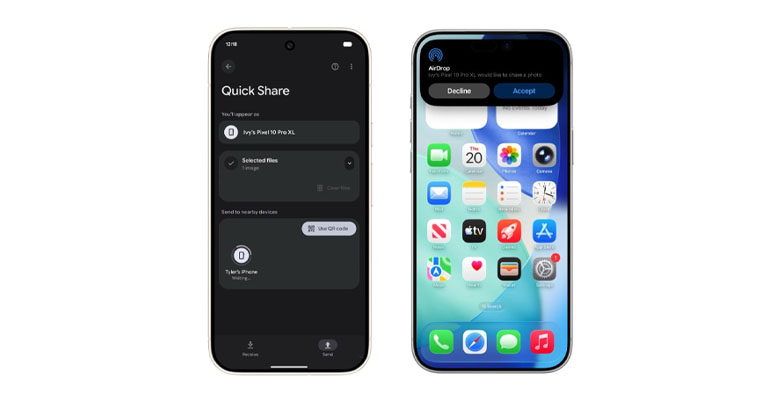
Google has made a surprising move by enabling native file sharing from Pixel 10 devices to Apple products, bypassing the usual restrictions of AirDrop’s platform exclusivity. Starting with the Pixel 10 lineup, users can now send photos, documents, and other files directly to iPhones, iPads, and Macs through a combination of AirDrop on the Apple side and Quick Share on the Android side. No extra apps or services are required to make this work.
The implementation is entirely independent of Apple, with Google developing its own solution without partnership or approval from the tech giant. According to a Google spokesperson, the company achieved this by building its own protocol, comparing it to picking a lock rather than waiting for a key. Security was a top priority during development, with the feature built using the Rust programming language and validated by an external security firm through penetration testing.
For Pixel-to-iPhone transfers, the iPhone user needs to set AirDrop to "Everyone for 10 minutes," after which the device appears in the Pixel’s Quick Share interface. Once selected, files transfer instantly and the recipient can accept them as they would any standard AirDrop item. The reverse is also possible: iPhone users can send files to Pixels that have enabled receive mode or set Quick Share to "Everyone for 10 minutes."
All transfers happen through a direct peer-to-peer connection, meaning no data passes through cloud servers or gets stored elsewhere. Both devices display each other’s names before any transfer begins, and receipt requires active user confirmation on the receiving end. Google emphasizes that nothing is pushed without explicit consent.
Currently, this functionality is limited to Pixel 10, Pixel 10 Pro, Pixel 10 Pro XL, and Pixel 10 Pro Fold models. It works with any iPhone, iPad, or Mac. A notable limitation is the reliance on the "Everyone for 10 minutes" AirDrop setting, rather than the more secure "Contacts Only" option available between Apple devices. Google has expressed interest in collaborating with Apple to support the tighter contact-based mode in future updates.
The broader implications remain uncertain. Apple has not publicly commented on Google’s initiative, leaving open questions about whether they might issue a software update to block this capability. Google frames this move as part of its ongoing effort to improve cross-platform experiences, similar to its work on RCS messaging support for iPhones and shared unknown tracker alerts. The company has indicated plans to expand this feature beyond the Pixel 10 series eventually, though no specific timeline has been provided.